Showing posts with label Blogger. Show all posts

optimize blog for mobileMake Blogger ready for Mobile Phones

In this day we can not ignore the importance of mobile internet. Because almost all of us have to use the mobile, and make easy to use internet access. And every internet provider company trying to provide best internet services like 3G's , Wifi, mobile apps,etc.

So many of your blog readers come through mobile phones. and our website is compatible for mobile phone browsers. But if you don't make the mobile friendly blog, then we have to lose a lot of mobile readers, because in a mobile phone, a normal blog takes lot of time to load and there are different problems that your website not fitting properly within the mobile screen.


Start working and make mobile friendly blog. sign in to your blog first.

Step No.1

Go to Blogger account > Template > Mobile

Blogger Templates

After click setting button a popup windows open clik "Yes. Show mobie template on mobile devices. and also choose mobile template and Save.

mobile template

Step No.2

Find this line >
<b:include data='blog' name='all-head-content'/>
And paste this code below that line...
<meta content='IE=EmulateIE7' http-equiv='X-UA-Compatible'/>
<b:if cond='data:blog.isMobile'>
<meta content='width=device-width, initial-scale=1.0, user-scalable=0' name='viewport'/>
<b:else/>
<meta content='width=1100' name='viewport'/>
</b:if>
Save Changes!

Now your blog ready for mobile browser with good speed. visit your blog for mobile view add ?m=1 tag in url example = http://bloggerknown.blogspot.com/?m=1

Thank you for your time for read this post i hope you like this post.

Tips and Tricks to Make Your Blog Stand Out
It seems like everyone has a blog these days, so it can be really hard to make your blog stand out. For every wildly successful blog with thousands of daily readers, there are dozens of blogs that are lucky enough to get a few clicks a week. If you are wondering why no one is reading your blog, these tips can tell you why and help you stand out from the crowd.

Hone in on Your Target Niche and Audience


The blogs with the highest number of visitors all share the same essential characteristics. They focus on writing about a single theme of topics and they make sure to write content that is in line with their target audience's interests. Your blog is yours to do whatever you want with it, but if you fail to grasp the attention of an audience, how can you expect it to stand out. Making the blog all about what you want and not about what your potential readers want is one of the most common ways that people irritate potential visitors.

Say Things Worth Saying


The old adage, “content is king” is especially true when it comes to writing a blog. It is not enough just to put a lot of words down on the page and hope people will look at it. You have to focus on writing interesting, informative, and most importantly compelling content if you want to stand out. Establish yourself as an expert in your area and show your readers that you have a lot to teach them. If your content weren’t worth reading, why would visitors bother to stick around?

Have a Good Design


Your blog design doesn't have to be perfect, but it should be visually interesting, functional and free of flaws. You do not have to build your site from scratch, but you don't want to choose a very limited platform either. WordPress is one of the greatest blogging platforms for new and experienced bloggers alike because it is user-friendly and offers a lot of options for customization. You can purchase affordable premium WordPress themes  to add a design flair and organization to your blog. Make sure to keep the design of your blog uncluttered. Keep the number of distracting ads to a minimum, and make sure the content is the most visible part of your blog. Readers aren't too picky when it comes to design, but if your website is hard to navigate or barely functional, readers will not want to stick around.

Find Ways To Bring in New Readers


Getting initial traffic to your blog is one of the hardest things to do as a blogger. If you aren't getting any visitors to begin with, you won't even have the chance to make your blog stand out from the competition. Focus on drawing new visitors to the site with a few simple marketing strategies, and then keep them coming back for more with your stellar content. Your marketing approaches don't have to be expensive or sophisticated, but you will have to work hard to build a steady stream of traffic.

Offer Something of Value


It might seem like a counterintuitive idea to give away your good ideas for free on your blog. However, the best blogs are the ones that offer something of value to the readers. If they don't get any benefit from reading the blog, then you aren't doing your job. Your blog posts should at least be either informative or entertaining, and ideally they would be both. You should strive to make a lasting impression on people with your blog post, by offering useful advice or information, or even by giving them a good laugh.


About author:Anny Solway is a dedicated writer at ThemeFuse – a leader in the WordPress premium themes area. She likes to discover new ideas about internet marketing, social media and blogging.
Custom Robots Header TagsBlogger is continuously improving search preference feature, Add Custom Robots Header Tags are very important for every blogger  for batter SEO. Today tutorial i tell you how to enable custom robots header tags in blogger. You have to be careful to setup custom robots text because if you do something wrong Google not index your page in search engine. Follow the instructions carefully and it'll positively help you to boost your web site traffic.

Step 1: To enable these tags, go to Blogger > Settings > Search Preferences, click Edit next to "Custom robots header tags," and select Yes.

Step 2: Select Yes Option and customize setting shown in the below image.

You must learn about tags when should you use them.
all:  There are no restrictions for indexing or serving. This is default for all pages
noindex:  Do not show this page in search results and do not show a "Cached" link in search results.
nofollow:  Do not follow the links on this page
none:  Equivalent to noindex, nofollow
noarchive:  Do not show a "Cached" link in search results.
nosnippet:  Do not show a snippet in the search results for this page
noodp:  Do not use metadata from the Open Directory project (DMOZ) for titles or snippets shown for this page.
notranslate:  Do not offer translation of this page in other languages in search results.
noimageindex:  Do not index images on this page.
unavailable_after: [RFC-850 date/time]: Do not show this page in search results after the specified date/time. The date/time must be specified in the RFC 850 format. Example: 17 May 2012 15:00:00 PST

Custom Robots Header Tags

Step 3: Now click on ""Save changes" button > Done

That's all! If you have any doubt or need help about it, please leave comment.
Are you searching for a best Blogger template for your Blogger Blog? therefore here i'm going to share SEO friendly optimized and that is most important factor for the web master.SEO optimized templates helps us to drive the a lot of traffic to our blog and search engines crawler also crawl and index them freely.I am sure that, all of this templates absolutely suitable for your blog.

High Quality SEO Optimized Blogger Templates Free Download
Yaminth Blogger Template

1. Yaminth Blogger Template Free Download


Descriptions: Yaminth template is optimized for Search engines like Google. This template helps your website to rank higher in search engines

Features: 2 Column with Right Sidebar
Show a thumbnail image (small image) for every post using this template


Demo | Download
Johny DemoSite Blogger Template

2. Johny DemoSite Blogger Template Free Download


Descriptions: Johny Jogos is another Gallery style template with white, black and blue color. Tag H1 and H2 ready to more SEO and visitor friendly to your blog.

Features:4 Columns, 3 Columns Footer, 1 Right Sidebar, 1 Sidebar, Gallery, photologs, Fixed width, Ads Ready, Adsense ready, Menu Links, Header Banner, Blue, White, Black.

Demo | Download
Windows 8 v2 Blogger Template

3. Windows 8 v2 Blogger Template Free Download


Descriptions: Windows 8 v2 Blogger Template is a free computer related blogger template. This template is best for Windows 8 blogs.

Features:Windows 8 v2 Blogger Template has 2 columns, 1 right sidebar, image slideshow,top nav ready, bookmark ready, white and black colors and many other features.

Demo | Download
My Magazine Premium Blogger Template

4. My Magazine Premium Blogger Template Download


Descriptions: MyMagazine is beautyful premium responsive blogger template layout with many future. It's social media icon, tab widget siderbar, JSON search result, emoticon and more. Color Available (Blue, Red, Green, Orange, and Turquoise).

Features:3 Columns, 2 Sidebar, White, Blue, Black, Fixed width, 3 Columns Footer, , Top Navigation Bar, Bookmark Ready, Ads Ready, Adsense ready.

Demo | Download
Google+ Comments

Bringing Google+ Comments to Blogger


Google introduced a new comments system for blogger.The feature isn't on by default. but once activated in the Blogger Dashboard, Google+ comments created about a blog post hosted by Blogger can seem aboard comments created directly on the blog without any extra effort from the blog owner.

About Google+ Comments


Google+ Comments is another to the default commenting system on Blogger, out there to blog authors who have upgraded their Blogger profile to Google+. Google+ Comments allows you to bring the following conversations together in one place, right under your blog post:

Comments created on your Blogger blog post
Comments on the blog post that you've shared to Google+
Shared content on Google+ that links to your blog post
Readers will need a Google+ page or profile to comment on your blog.

Bringing Google+ Comments to Blogger

Features of Google+ Comments


Google+ Comments look similar to traditional Blogger comments, but have some important differences. For example:

  • When you leave a comment on a blog, you'll see the option, checked by default, to also share that comment to Google+.
  • Google+ posts that link to blog posts will show up as a comment underneath those blog posts
  • If original comment is shared to Google+, replies to the comment on the blog will show up in Google+ and vice versa, but only to the people that the original comment was shared with
  • If a comment is not shared with the blog author, the blog author will not be able to see the comment in either location
  • As the author of a post, you’ll receive Google+ notifications when readers comment on or share your blog post.

How to Activate and Apply Google+ Comments on Blogger.

  1. First need a google plus account if you have not already then click here.
  2. Connect your default blogger profile to google plus profile? How to Transfer Blogger Profile to Google Profile
  3. Go to Blogger Dashboard
  4. Select the tab  Google+ and select the Use Google+ Comments on this blogv ,see the below picture:
Google+ comments enable

Happy commenting!

Metro Simple Premium Blogger Template


Metro Simple Premium Blogger Template


Blog Template Name: Metro Simple Blogger Template
Template Type : Free Blogger Template
Author:  blog.nguoiaolam.net
Designer: Hong Hoa
Basic Instructions : How to install a Blogger template

Metro Simple is a free premium blogger template with 2 columns, 1 Right Sidebar, 1 Sidebar, 3 Columns Footer, White, Blue, Fixed width, Magazine, Menu Links, Top Navigation Bar, Bookmark Ready, Header Banner, Adsense ready, slideshow, social bookmarking icons, posts thumbnails, tabs, drop down menu and threaded comments ready.

Favicon In Favico.Com

Maybe all friend already know what is Favicon?? Yapss ... Favicon stands for "Favourite Icon" which is a picture / logo from a website or blog that appears on the browser, the user Blogger - Blogspot by default already has the form of a default favicon icon logo blogger.
Blogger Favicon is an image with the letter B logo with orange color background. If it is too general you can replace it with our own image. Favicon image that can be used is the image format. Ico, Well this time I gave a little tutorial of how to make their own favicon in favico.com.
Favico.com is one site favicon providers, there are many more sites like favicon.cc favicon providers, etc.

How to Make it??

1. Set up drawings / make first picture jpg or png format.
2. Open Site Favico.com.
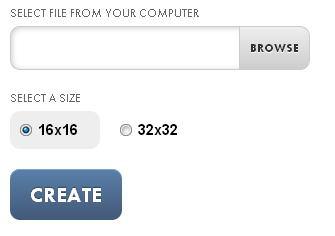
3. Click browse and select the folder icon image that will be created blog> choose size 32x32> and click Create.
Make Your Own Favicon
4. If It first click Preview to see the result and click download.
Make your own favicon online free

How can Add this Favicon in Blog?

1. Go to Dashboard> Layout> Click Edit on the favicon blog.
2. Then will come a new tab, click choose file and select the favicon that was created earlier. and click save.

Upload Favicon

Thank you. I hope you will like this tutorial.
Today I will explain how to make the "Menu Navigation" very cool with transition effects. Transition effect is an effect where we set the time changes in the css tersebut.Berikut demo of "Menu Navigation" is.

Navigation Menubar for blogger


  1. Go To Blogger > Design > Edit HTML
  2. Back up your template
  3. Search (Ctrl+F) for   ]]></b:skin>
You simply add the following code above the code]]> </ b: skin>


 CSS Code:
 /*URL: http://www.bloggerknown.blogspot.com/ */
@import url(http://fonts.googleapis.com/css?family=Dosis:400,700);
.navbar {
 font-family: 'Dosis', sans-serif;
 position:relative;
 display:table;
 float:none;
 list-style-type:none;
 padding:0;
 margin:20px auto 250px auto;
}
.navbar:before {
 position:absolute;
 display:block;
 content: "";
 z-index:-1;
 width:100%;
 height:18px;
 bottom:-9px;
 left:2px;
 background: -moz-radial-gradient(center, ellipse cover,  rgba(0,0,0,0.7) 0%, rgba(0,0,0,0) 75%);
 background: -webkit-gradient(radial, center center, 0px, center center, 100%, color-stop(0%,rgba(0,0,0,0.7)), color-stop(75%,rgba(0,0,0,0)));
 background: -webkit-radial-gradient(center, ellipse cover,  rgba(0,0,0,0.7) 0%,rgba(0,0,0,0) 75%);
 background: -o-radial-gradient(center, ellipse cover,  rgba(0,0,0,0.7) 0%,rgba(0,0,0,0) 75%);
 background: -ms-radial-gradient(center, ellipse cover,  rgba(0,0,0,0.7) 0%,rgba(0,0,0,0) 75%);
 background: radial-gradient(center, ellipse cover,  rgba(0,0,0,0.7) 0%,rgba(0,0,0,0) 75%);
 filter: progid:DXImageTransform.Microsoft.gradient( startColorstr='#b3000000', endColorstr='#00000000',GradientType=1 );
 opacity:.4;
}
.navbar:after {
 position:absolute;
 display:block;
 content: "";
 z-index:-1;
 width:100%;
 height:100%;
 top:0;
 left:0;
 -webkit-box-shadow: 0px 2px 4px 0px rgba(0, 0, 0, 0.25);
 box-shadow: 0px 2px 4px 0px rgba(0, 0, 0, 0.25);
}
.navbar > li {
 position:relative;
 float:left;
 display:inline-block;
 list-style-type:none;
 text-align:center;
 margin:0;
 border-left:0;
 border:1px solid rgba(0,0,0,0.5);
 line-height:35px;
 -webkit-box-shadow: inset 1px 1px 0px 0px rgba(255, 255, 255, 0.25);
    box-shadow: inset 1px 1px 0px 0px rgba(255, 255, 255, 0.25);
 -webkit-transition: all 300ms ease-in-out;
 -moz-transition: all 300ms ease-in-out;
 -ms-transition: all 300ms ease-in-out;
 -o-transition: all 300ms ease-in-out;
 transition: all 300ms ease-in-out;
}
.navbar.color1 > li {
 background:#ea7900;
}
.navbar.color2 > li {
 background:#336277;
}
.navbar.color3 > li {
 background:#3e781b;
}
.navbar.color4 > li {
 background:#ad2259;
}
.navbar.color5 > li {
 background:#b20a22;
}
.navbar > li:before {
 position:absolute;
 display:block;
 content: "";
 z-index:1;
 width:100%;
 height:100%;
 left:0;
 top:0;
 background: -moz-linear-gradient(top,  rgba(255,255,255,0.15) 0%, rgba(0,0,0,0.16) 100%);
 background: -webkit-gradient(linear, left top, left bottom, color-stop(0%,rgba(255,255,255,0.15)), color-stop(100%,rgba(0,0,0,0.16)));
 background: -webkit-linear-gradient(top,  rgba(255,255,255,0.15) 0%,rgba(0,0,0,0.16) 100%);
 background: -o-linear-gradient(top,  rgba(255,255,255,0.15) 0%,rgba(0,0,0,0.16) 100%);
 background: -ms-linear-gradient(top,  rgba(255,255,255,0.15) 0%,rgba(0,0,0,0.16) 100%);
 background: linear-gradient(top,  rgba(255,255,255,0.15) 0%,rgba(0,0,0,0.16) 100%);
 filter: progid:DXImageTransform.Microsoft.gradient( startColorstr='#26ffffff', endColorstr='#29000000',GradientType=0 );
}
.navbar > li:after {
 position:absolute;
 display:block;
 content:"";
 width:100%;
 height:100%;
 top:0;
 left:0;
 background: url("data:image/png;base64,iVBORw0KGgoAAAANSUhEUgAAAAUAAAAFCAYAAACNbyblAAAAGXRFWHRTb2Z0d2FyZQBBZG9iZSBJbWFnZVJlYWR5ccllPAAAAyJpVFh0WE1MOmNvbS5hZG9iZS54bXAAAAAAADw/eHBhY2tldCBiZWdpbj0i77u/IiBpZD0iVzVNME1wQ2VoaUh6cmVTek5UY3prYzlkIj8+IDx4OnhtcG1ldGEgeG1sbnM6eD0iYWRvYmU6bnM6bWV0YS8iIHg6eG1wdGs9IkFkb2JlIFhNUCBDb3JlIDUuMC1jMDYxIDY0LjE0MDk0OSwgMjAxMC8xMi8wNy0xMDo1NzowMSAgICAgICAgIj4gPHJkZjpSREYgeG1sbnM6cmRmPSJodHRwOi8vd3d3LnczLm9yZy8xOTk5LzAyLzIyLXJkZi1zeW50YXgtbnMjIj4gPHJkZjpEZXNjcmlwdGlvbiByZGY6YWJvdXQ9IiIgeG1sbnM6eG1wPSJodHRwOi8vbnMuYWRvYmUuY29tL3hhcC8xLjAvIiB4bWxuczp4bXBNTT0iaHR0cDovL25zLmFkb2JlLmNvbS94YXAvMS4wL21tLyIgeG1sbnM6c3RSZWY9Imh0dHA6Ly9ucy5hZG9iZS5jb20veGFwLzEuMC9zVHlwZS9SZXNvdXJjZVJlZiMiIHhtcDpDcmVhdG9yVG9vbD0iQWRvYmUgUGhvdG9zaG9wIENTNS4xIFdpbmRvd3MiIHhtcE1NOkluc3RhbmNlSUQ9InhtcC5paWQ6OERFQkEzRUJDNUM5MTFFMUE3NzBCMTZBMEExNEQ5NUQiIHhtcE1NOkRvY3VtZW50SUQ9InhtcC5kaWQ6OERFQkEzRUNDNUM5MTFFMUE3NzBCMTZBMEExNEQ5NUQiPiA8eG1wTU06RGVyaXZlZEZyb20gc3RSZWY6aW5zdGFuY2VJRD0ieG1wLmlpZDo4REVCQTNFOUM1QzkxMUUxQTc3MEIxNkEwQTE0RDk1RCIgc3RSZWY6ZG9jdW1lbnRJRD0ieG1wLmRpZDo4REVCQTNFQUM1QzkxMUUxQTc3MEIxNkEwQTE0RDk1RCIvPiA8L3JkZjpEZXNjcmlwdGlvbj4gPC9yZGY6UkRGPiA8L3g6eG1wbWV0YT4gPD94cGFja2V0IGVuZD0iciI/PiSp0pIAAAAySURBVHjaYmBgYOAHYmYGCADR/CDiDxDzQAW5gPgLlM3ACsQKUBqhBYjZkY3CMBMgwACvHQKnyUp+6gAAAABJRU5ErkJggg==");
}
.navbar > li.drpdown a > span{
 margin-right:30px;
}
.navbar > li.drpdown > a:after {
 position:absolute;
 content: "\0025bc";
 z-index:1;
 font-size:8px;
 top:0;
 right:10px;
 color:#fff;
 text-shadow: 0px -1px 0px rgba(0, 0, 0, 0.8);
    filter: dropshadow(color=#000, offx=0, offy=-1);
 -webkit-transition: all 300ms ease-in-out;
 -moz-transition: all 300ms ease-in-out;
 -ms-transition: all 300ms ease-in-out;
 -o-transition: all 300ms ease-in-out;
 transition: all 300ms ease-in-out;
}
.navbar > li.drpdown a:hover:after,.navbar > li a:hover {
 color:#ccc;
}
.navbar > li.drpdown:hover .drpcontent {
 display:block;
}
.navbar > li:first-child {
 border-left:1px solid #1a1a1a;
}
.navbar > li:last-child {
 -webkit-box-shadow: inset 1px 1px 0px 0px rgba(255, 255, 255, 0.25),inset -1px 0px 0px 0px rgba(255, 255, 255, 0.25);
    box-shadow: inset 1px 1px 0px 0px rgba(255, 255, 255, 0.25), inset -1px 0px 0px 0px rgba(255, 255, 255, 0.25);
}
.navbar > li > a {
 position:relative;
 display:block;
 width:100%;
 text-decoration:none;
 font-size:12px;
 color:#fff;
 text-shadow: 0px -1px 0px rgba(0, 0, 0, 0.4);
    filter: dropshadow(color=#000, offx=0, offy=-1);
 z-index:4;
 -webkit-transition: all 300ms ease-in-out;
 -moz-transition: all 300ms ease-in-out;
 -ms-transition: all 300ms ease-in-out;
 -o-transition: all 300ms ease-in-out;
 transition: all 300ms ease-in-out;
}
.navbar > li:hover {
 -webkit-box-shadow: inset 0px -2px 8px 0px rgba(0, 0, 0, 0.35);
 box-shadow: inset 0px -2px 8px 0px rgba(0, 0, 0, 0.35);
}
.navbar > li > a > span {
 position:relative;
 font-weight:bold;
 margin:0 15px 0 0;
}
.navbar > li  .drpcontent {
 position:absolute;
 display:none;
 margin:0;
 padding:20px 0 0 0;
 z-index:5;
 top:36px;
 min-width:200%;
 float:none;
 list-style-type:none;
 border:1px solid #737373;
 border-top:0;
 -webkit-box-shadow: 0px 2px 4px 0px rgba(0, 0, 0, 0.25),inset 0px 6px 4px -4px rgba(0, 0, 0, 0.5);
 box-shadow: 0px 2px 4px 0px rgba(0, 0, 0, 0.25),inset 0px 6px 4px -4px rgba(0, 0, 0, 0.5);
 -webkit-border-radius: 0px 0px 4px 4px;
 border-radius: 0px 0px 4px 4px;
 background: rgb(249,249,249);
 background: -moz-linear-gradient(-45deg,  rgba(249,249,249,1) 0%, rgba(229,229,229,1) 100%);
 background: -webkit-gradient(linear, left top, right bottom, color-stop(0%,rgba(249,249,249,1)), color-stop(100%,rgba(229,229,229,1)));
 background: -webkit-linear-gradient(-45deg,  rgba(249,249,249,1) 0%,rgba(229,229,229,1) 100%);
 background: -o-linear-gradient(-45deg,  rgba(249,249,249,1) 0%,rgba(229,229,229,1) 100%);
 background: -ms-linear-gradient(-45deg,  rgba(249,249,249,1) 0%,rgba(229,229,229,1) 100%);
 background: linear-gradient(135deg,  rgba(249,249,249,1) 0%,rgba(229,229,229,1) 100%);
 filter: progid:DXImageTransform.Microsoft.gradient( startColorstr='#f9f9f9', endColorstr='#e5e5e5',GradientType=1 );
 -webkit-transition: opacity 300ms ease-in-out;
 -moz-transition: opacity 300ms ease-in-out;
 -ms-transition: opacity 300ms ease-in-out;
 -o-transition: opacity 300ms ease-in-out;
 transition: opacity 300ms ease-in-out;
}
.navbar > li:not(:last-of-type) .drpcontent {
 left:-1px;
}
.navbar > li:last-child .drpcontent {
 right: -1px;
}
.drpcontent li {
 position:relative;
 text-align:left;
 border-bottom:1px solid rgba(0, 0, 0, 0.2);
 font-size:12px;
 line-height:35px;
 height:35px;
 font-weight:bold;
 -webkit-box-shadow: inset 0px -1px 0px 0px rgba(255, 255, 255, 0.2);
 box-shadow: inset 0px -1px 0px 0px rgba(255, 255, 255, 0.2);
 overflow:hidden;
}
.drpcontent li:before {
 position:absolute;
 display:block;
 content: "";
 width:100%;
 height:100%;
 top:-100%;
 left:0;
 background: #cecece;
 -webkit-transition: all 500ms ease-in-out;
 -moz-transition: all 500ms ease-in-out;
 -ms-transition: all 500ms ease-in-out;
 -o-transition: all 500ms ease-in-out;
 transition: all 500ms ease-in-out;
 opacity:0;
}
.drpcontent li:after {
 position:absolute;
 display:block;
 content: "\0025b6";
 height:20px;
 width:20px;
 top:0;
 left:6px;
 font-size:8px;
 -webkit-transition: all 500ms ease-in-out;
 -moz-transition: all 500ms ease-in-out;
 -ms-transition: all 500ms ease-in-out;
 -o-transition: all 500ms ease-in-out;
 transition: all 500ms ease-in-out;
}
.drpcontent li:hover:before {
 top:0;
 opacity:0.8;
}
.drpcontent li:hover:after {
 color:#fff;
 left:12px;
}
.drpcontent li:last-child:hover:before {
 -webkit-border-radius: 0px 0px 4px 4px;
 border-radius: 0px 0px 4px 4px;
}
.drpcontent li a {
 display:block;
 height:100%;
 width:100%;
 position:relative;
 color:#000;
 text-decoration:none;
 width:100%;
 padding-left:20px;
 -webkit-transition: all 500ms ease-in-out;
 -moz-transition: all 500ms ease-in-out;
 -ms-transition: all 500ms ease-in-out;
 -o-transition: all 500ms ease-in-out;
 transition: all 500ms ease-in-out;
}
.drpcontent li:hover a{
 color:#fff;
 padding-left:26px;
}
.drpcontent li:first-child {
 border-top:1px solid #a6a6a6;
}
.drpcontent li:last-child {
 border:0;
 -webkit-box-shadow:none;
 box-shadow:none;
 -webkit-border-radius: 0px 0px 4px 4px;
 border-radius: 0px 0px 4px 4px;
}
.icon20{
 position:relative;
 float:left;
 display:block;
 width:20px;
 height:20px;
 margin:6px 8px 0 8px;
 background: url("data:image/png;base64,iVBORw0KGgoAAAANSUhEUgAAAHgAAAAoCAYAAAA16j4lAAAAGXRFWHRTb2Z0d2FyZQBBZG9iZSBJbWFnZVJlYWR5ccllPAAAAyJpVFh0WE1MOmNvbS5hZG9iZS54bXAAAAAAADw/eHBhY2tldCBiZWdpbj0i77u/IiBpZD0iVzVNME1wQ2VoaUh6cmVTek5UY3prYzlkIj8+IDx4OnhtcG1ldGEgeG1sbnM6eD0iYWRvYmU6bnM6bWV0YS8iIHg6eG1wdGs9IkFkb2JlIFhNUCBDb3JlIDUuMC1jMDYxIDY0LjE0MDk0OSwgMjAxMC8xMi8wNy0xMDo1NzowMSAgICAgICAgIj4gPHJkZjpSREYgeG1sbnM6cmRmPSJodHRwOi8vd3d3LnczLm9yZy8xOTk5LzAyLzIyLXJkZi1zeW50YXgtbnMjIj4gPHJkZjpEZXNjcmlwdGlvbiByZGY6YWJvdXQ9IiIgeG1sbnM6eG1wPSJodHRwOi8vbnMuYWRvYmUuY29tL3hhcC8xLjAvIiB4bWxuczp4bXBNTT0iaHR0cDovL25zLmFkb2JlLmNvbS94YXAvMS4wL21tLyIgeG1sbnM6c3RSZWY9Imh0dHA6Ly9ucy5hZG9iZS5jb20veGFwLzEuMC9zVHlwZS9SZXNvdXJjZVJlZiMiIHhtcDpDcmVhdG9yVG9vbD0iQWRvYmUgUGhvdG9zaG9wIENTNS4xIFdpbmRvd3MiIHhtcE1NOkluc3RhbmNlSUQ9InhtcC5paWQ6NjJERkRDNTBDNUQ0MTFFMUI3QjJDOTZFNDMzQ0IwMjciIHhtcE1NOkRvY3VtZW50SUQ9InhtcC5kaWQ6NjJERkRDNTFDNUQ0MTFFMUI3QjJDOTZFNDMzQ0IwMjciPiA8eG1wTU06RGVyaXZlZEZyb20gc3RSZWY6aW5zdGFuY2VJRD0ieG1wLmlpZDo2MkRGREM0RUM1RDQxMUUxQjdCMkM5NkU0MzNDQjAyNyIgc3RSZWY6ZG9jdW1lbnRJRD0ieG1wLmRpZDo2MkRGREM0RkM1RDQxMUUxQjdCMkM5NkU0MzNDQjAyNyIvPiA8L3JkZjpEZXNjcmlwdGlvbj4gPC9yZGY6UkRGPiA8L3g6eG1wbWV0YT4gPD94cGFja2V0IGVuZD0iciI/Psj8MzMAAA91SURBVHja7FxbbBTVHx4QL6DAcPXeXQpFDQhbH0iMie48+mBsQwghIXZrgiQi7pRbBcHdNYiChd1ykSAk2/KAD6IgPPFAdvHFx24fDGhEphBqBbHTchG80P/3jec00+nM7Oy69h8JJxk6e+bMb8453+8+v2HUwMCAcrfduW3MSD/wo48+Uh966KEcz69du6a98847Zrm0MplMErQSY8b8vYw///yTNFO6rifvRLBaW1vTDz74YAzrVcV6zevXr7fF4/GmsgH++OOPI+PHj7cAuXr1qrZ27dpCuRPcunWr+uSTT+ZmzJgR4e9z587l0Kc1NzeXBXI4HFZmzZqlAGRFMIzyww8/jOimJ5PDeWnUqFHKvffeG77//vvr7rvvvhAAibCP2vKPP/4o3Lp1qxPH0b/++stMJBKBnvPpp5+m586dqz/22GPKAw88YPXdvHlT7e7u1nFNeeONN5pKBnjHjh2RmTNnEhBVAoI+bdWqVYVywH3iiSdymGSEwLCBGwl02SCrqqqApvWXzTRN5Zdffvm/Sdjo0aO5+dEJEyYkJk2aFOW8yHwE5J577lEAqPLbb79F+/v7ld7e3iyOtg8//DC1fv16oxhtMLI+Z84cZfLkyYpdY/E3mEfHz9IAJrgAloAQGKsPk1VBrGSQt23bFobkHsEESXNQ4niORu7OYUz9unXrjP+q+uSmT5w4Ucc60ziUqVOnkoEVSLB1jeDfvn3bAgXSS22o9PT0xC5evBjbtWtXZuXKlU1+9B9//HFlypQpg+CyQUtYfbxWkop2gitVggCa4hIY5O3bt1Nic88884waCoUscLlYwTAWyPgdwcQ7MFZbvXq1L83NmzeHIQ1hSsezzz4bouqzq0bQCe3duzdKaYbEGBs3bjSC2O+gzc3OkwY2OllTU5PAoUybNs3aM7lOt0bJ4ziqXMMw9P3796vLli1r9BoPda+4zZV9vBYYYDdw5SbyvFSQYb/Nhx9+uB5/+bMBdigmrwkPvg3X2jGGKraomoaUqJCOI9hQ/rW42M7R6IvBrMSuXLliQl1rXnSefvrpBE2FZN6gDXaPgNBwWgBT9UId1z311FMJMLHinJNX433ck7Fjx1qSDqBisKVdsKXDjPrBgwfDL730kict4sMxr7322nBm5ibLg9L25Zdf9n7//fcDN27cGIBKGXA29vEax3As77HT8DtOnz6dhNc3SIvn7At6vzzy+XwY/kBHX1/fACRqkB7P2cdrHFNkLgNweAZKbbyH90o6cEKV48ePn7tw4UJZ9OS8f/rpp4ETJ050uM310KFDkfPnz3vez2sc43bv6CCS6+QWKckcy3t4bxDupwOETRj8zfNynCJws0GPHqcFp4pmH69xjB8NrqFU9SxVol3qoUli0ARhSm459GxaQHnkkUdc93HJkiWF33//PUPz4GYyeI1jXB2/UsD9pyBzMvbECs/dJh2kwf6akFQN9rBA54UHz9nHayPlXMG0vEpb6mcH3ZoImUxowww866P4bUK1H/UaD4esFWOH9bOP13xtMJ2goOC6gUybjAkyVp4kr2/ZskUdN25cApOOgMMKTWh+9NJo8DgjjBMx6dSGDRuGgGSnxzFwcprmz59vdnZ2apw/x8A2auwTTlRajnWjV6kGcKN0FoPsmR1czMm4dOlSLYRjcF604V7thRdeMH788ccU98AeJkEDpnjNM3TjP1AP9bhRo9dXykQ5lvfwXtKQ/S0tLVGECh0Ii3Q4HwY2IcX+aDSahPfLB1gHz9knNirFsbyH95KGFz2ow5S8RkDheNXykOCycYwXvUo2xLyqn/QSTDhm5uXLl2fgqOU5GF6BzW0Hc5bEdLgnb5dinrOvaKpS07S8tJH2ydJjhJSOcniRA3YbxHgOcVhexmJ79uxJY2N1SLYJiWzEBrcFmfzSpUu52MZvv/32FMBJA/wcaGV4rZL0VqxY0VTh5EYejO7JPExuANj8d999Z1Ag4L0XwBQM4xoATkkpVex1lMwhG8/Zh9N8oDDJqeMZtcDw+/Y57yEYOOj+q1hYFp5h9ueff2bmJhWPx5MeOdYkNECCoVJVVZUiEwWgoQualaRXUYARCZyCGYjSUXJr9A2wR3UQnhiYQWUmS2S4wgiPkjLc8ms0T9OnT0/At9CZOJGN51zngQMHJkLdu5qhMc7JOGM+tzjQ7x5u5qOPPmr1k2Npn7jJcH4avBZTU1PTIDNcUPdWfMhNkMxTaXqVbIi3MwA5Ds2nupk3As9nYz5ZXocpsXwXZqDAgKEi6V3a94bq6uoYk0SM27ke2XjOPuyNjnE6NFQbHM325ubm/L/2NgkOQEFkpqxF8KAqYfbp8OHDOWdYRMmaN28eIw3Fzp0ElLSEGqwoPcGoKTgpZWWyeK/83d3dbUKjadjsHIAbBjIBZtZKOq9MbMhwDutq8njBE4VkZqHOw9RCPEhDJEQURwbNok2tCs0W4wGJNqDhGteuXZuvOMBYvIFNiNg3l5kdToC2Ctw+ZDwnzQU4sz9iIw1xXlF6IpPlqh77+/uzfCVHYNx8EG4q7h38TXMB+1pAvwY/JA2go84UJedCyRVhoYnNbz1//nwGNth0MS91s2fPPkINxPBLZru8TIDIgVvaiuMp6TBlTATlQKveqaINTCIc1JPmhHmPwxFoh4TV2QGRqpWc5lTp3AxO0vlM4UC0i/OK0iviFTdi409BMtIAQqV58GtU+wjP6ExZCRYwVwRz43zn0+aKfTVhpzvBMIW+vr48pb6rq8tiDpeXChG+NWL4SYc3KBZkAO4JGZxJE6pvPDMy6m5Fh3s7e/ZsBIBksdm1I/nckydPJmtraxNUyf+k/frrr0pHR0fqLsB3eBt9dwvu7DbiNVkrV65kyjEn7Je2a9euslOIq1evTjJ1Jx0QJhWYlty+fXvyTgRrzZo1aThcdABVsV4TcXVbS0tL+TVZ8Xg8AsOdE0G9Bs+s7Jqst99+W4UTkqMjwd8XL17MoU/buXNnWSDzZTnjbnqZbFiscuHChRHd9OXLl3t5t2E4WnXwoEMAZLAmC1403wx1wgGyarL27dsX6DnvvvtueubMmbr9xcatW7eY/NFxTfnggw9Kr8latWpVhHVUAESVgKBP27FjR6EccKdPn57DJCMEhg1esFWTVS7IDCFAUxHFBFbaNEDNwL/WCCI2PwqBSGBOUc6L3iwjAFmTBVCs0I7hGObb9tZbb6V2795tFKMNRtaxd/TyFbvGYohUVk0WwQUQBIRSZ/UxXcj6qVJBhhZgwH6kuro6wpy1lDiRv7ZqsjCmHtrB+K+qTxGm6FhnmvvF7BXXyRiY12RNFkFhyMbw6sqVK7FLly7F1q1bl9m2bZtvCpWMTDDt8bCMgXmtJBXtBFfGoAJoq1wnKMhNTU0RxJJWZSZjSi5aJgJ4TpCZqcLEOzBWS6fTvjTffPPNMMaHKR2zZs0aVpMFOqH169dHKc2M0T/55BMjiP0O2tzsPGlgo5NVVVUJmgzGodwzr5osxqoEhuOYeUPcrW/cuFHdvHmzZ02WZBQ3xvIrERoTBFy5iTwvFWRsojllypR6kUNl/jjmGNKGa+1MuQGUovqVlZ1oR1ibRSlxpu7QF4NZifX19bHEy7MmKxwOJ2gq7AmUII3S193dPViTRRDBbHWhUCjB7JNzTp7hy9+vWS17KjJVMdjSLtjSYQ7i+++/H37uued8TQPHvPfee4YvwH7gSkKlgowJ86HWg7/44osoU4zydSM3C05C18KFC/NBNxiqrLB///5a0CHIEefbFToh+Fvo6emp37Bhg1HMQStHgu2NAEEzpZkipESWSk9IvzWXmzdvvuqWPuWXDH4VmiJ7p/rGwcXAdQOZY3kP7w2yGDpA9hIdnpfjFC1btsxgiMWEvctlVnBoHONHQzo+5dhaO1MBnBj2wCrjLYeeTQvwxYHrPoJRC/C6M07mkgzHaxzjCXBQcP8pyJyMsybLbdJB2uLFi0149RpCo8GaLJ6zj9dGyrkCKK9ScoOUytqbfPEAqc3wMxbyP6TQsyYLDlmr1+tbXvO1wXSCgoLrpa6dNVkrVqxQoYr5Oi7C2A9OSVORpEVajuXruD179gwByY3ekiVLzM8++0wjg3EMbKPGviD0KtX4iYrtFWBgcPlmq7e3t/aVV14JNK/XX3/dOHbsWIp7YA+ToAFTvOYLMGKrevG+MldqTZYovtMYn8mm6zptbRbczTdTbSwMY78o6h5iY6LRqPUXKi7F0hosXgdH1oFGYyaTyfvRYxOADnsh4Eevkg0esernqMnqScS+nKMqkkYq1tB+9uzZkpgO9+SxrgS9cCm97Cuaqly+fLk16OTJk0PsC52g559/fgji33zzzYB9DOO5l19+efAhzc3NdDgYD7IMtHHRokVtQSa/adMmq4bq888/P4VFpPmJKWhZNVmVpLd169aKluyA4Xxrsmg6IKn5rq4uQ3jvBcyFYVwDwCkppQomiTrrytmnBK3Jcup4xpLOxj6GNF73YAE6PUqWsPALut27d2f56qq/vz/V0tKS9MixJvlFHl+R0cuWiQJoBl0AXEl6FQUY6z8FMxD1kmICjDF1UKUxMILKTJbIcIWh2pNKgJosmiesJcEvDJ2f6nCdYOaJ2BNXM+Rbk8Wv4JzN2ee8h5vJ4F3WUDHW4ybDPnrWUFVVVTUwbOFYmgpZRyWZp9L0KtkAHAvX49hsz5osPhvzycpCBYZWDI0AWqhIepf2vYFxPdds/zZYpHqtPtZkYY06NFQb5tK+c+fO/L/2NgkL4uckEVmmwoOqhDVUiGFzzrCIklVTUxNmlsvOnQSUtIQarCg9YX5ScFLKymTxXptdNMGAGjY7BykeBjJDIPon0nm1lSV71mTF43F+Y5xlYRm1EDUmaThLd2QMTdoUAqY+IckxSLQBDdfY2tpa+ZosLN7AJkTsgbksDqNP5ZQiWWHozP6IjTTEeUXpsS1cuNBVPX799ddZvpLj89x8ELYFCxbYwxeW7BSw2dq0adPS/ADcmZTgXCi5Iiw0YeZae3p6MmQOF/PCrNgRSqYsvfH7FFWW6nAcmZuMDVMWhobLgdbQmixMoOSaLN7jcATaIWF1dumR1YR8uLOCROSPh4UZwoFoF+cVpefXXnzxxcYTJ06cgmSkIQVqABvMXDI1RIGvU5mswNw43yE1WbDTnfyE59q1a/nLly+bvIe+hMtLhUh1dfVg4WBQLGTqk/tCaSdTsFjxbsmOR/vqq6/4TVUWXvuI1mTt3bs3yW+X7WFnOY3/TcSZM2fu1mTd6e1/AgwAINwEgYdXHAgAAAAASUVORK5CYII=") no-repeat;
 -webkit-transition: all 300ms ease-in-out;
 -moz-transition: all 300ms ease-in-out;
 -ms-transition: all 300ms ease-in-out;
 -o-transition: all 300ms ease-in-out;
 transition: all 300ms ease-in-out;
}
.icon20.home {background-position:0 0;}
.icon20.upload {background-position:-20px 0;}
.icon20.download {background-position:-40px 0;}
.icon20.comments {background-position:-60px 0;}
.icon20.theme {background-position:-80px 0;}
.icon20.login {background-position:-100px 0;}
.navbar > li:hover .icon20.home {background-position:0 -20px;}
.navbar > li:hover .icon20.upload {background-position:-20px -20px;}
.navbar > li:hover .icon20.download {background-position:-40px -20px;}
.navbar > li:hover .icon20.comments {background-position:-60px -20px;}
.navbar > li:hover .icon20.theme {background-position:-80px -20px;}
.navbar > li:hover .icon20.login {background-position:-100px -20px;}
Save templates

HTML Code: 
You can add this code to widget  HTML / Javascript.


<script type="text/javascript" src="https://bloggerknown.googlecode.com/files/jquery.min.js"></script>
<ul class="navbar color1">
 <li><a href="#"><i class="icon20 home"></i><span>Home</span></a></li>
 <li><a href="#"><i class="icon20 upload"></i><span>Upload</span></a></li>
 <li><a href="#"><i class="icon20 download"></i><span>Download</span></a></li>
 <li class="drpdown"><a href="#"><i class="icon20 comments"></i><span>Posts</span></a>
  <ul class="drpcontent">
   <li><a href="#">Latest Posts</a></li>
   <li><a href="#">Popular Posts</a></li>
   <li><a href="#">Private Posts</a></li>
  </ul>
 </li>
 <li><a href="#"><i class="icon20 login"></i><span>Login</span></a></li>
 <li class="drpdown"><a href="http://www.bloggerknown.blogspot.com/"><i class="icon20 theme"></i><span>Themeselector</span></a>
  <ul class="drpcontent" id="themeselect">
   <li><a href="#" data-color="color1">Orange</a></li>
   <li><a href="#" data-color="color2">Marine</a></li>
   <li><a href="#" data-color="color3">Green</a></li>
   <li><a href="#" data-color="color4">Purple</a></li>
   <li><a href="#" data-color="color5">Red</a></li>
  </ul>
 </li>
</ul>


Replace # with the URL and replace the blue text with the name you want the navigation menu.
Extras!!!. If there is an error on your blog in the navbar. Please replace the text that reads navbar on CSS3 code above.

Blogger provides a simple way for you to make money with your blog. AdSense is Google's content- targeted advertising program. If you use AdSense, you don't have to select keywords or categories for your ads. Instead, Google's servers determine what your posts are about and display the most relevant ads to your readers. For example, if you blog about , you might see ads for “Baseball” next to your post. If you blog about painting, you might see ads for “Art Supplies.”
SIGN UP FOR ADSENSE

Starting a new account with Google AdSense is one of the easiest ways to start monetizing your blog. While Google AdSense might not make you rich, it's a simple and useful tool. In fact, it's usually the first step bloggers typically take to earn an income from their blogs because it is so easy to get started.

Please Follow instructions below:

1. Read the Google AdSense program policies.

2. Visit the Google AdSense home page.
Click on the 'Sign Up Now' button in the upper righthand corner of your screen.

3. Complete the online application.
You will need to provide your blog's URL and primary language as well as answer some questions related to the rules of the Google AdSense program. You'll also need to provide your payment information to receive the money you generate on your blog from Google.

4. Access your new account and review the ads available to you.
Google AdSense provides a Broad range of advertising options to bloggers from text ads to image ads and more. Take some time to research everything that's available to Assessment what will work best for your blog.

5. Select your ad design choices.
Once you've decided which ad opportunities are best for your blog, select them. Google will provide a snippet of HTML code to you after you make your selection.

6. Insert your Google AdSense HTML code into your blog.
Copy and paste the HTML code provided by Google into your blog's template. One of the easiest ways for a beginner blogger to do this is by inserting a text widget into his or her blog's template and pasting the code in the widget.

7. Let Google do the rest.
It may take a few hours or a few days for Google to start serving ads on your blog. Google will search your blog to determine the predominant subjects of each page. When readers visit your blog, the HTML code you pasted into your blog from Google will activate and relevant ads will be displayed based on each page's content.

8. Collect your money.
Intro to Adsense Payment
Remember, Google AdSense typically pays based on click-throughs (the number of times people click on an ad). Therefore, Google AdSense is unlikely to generate a large income for you, but every bit helps!

This Topic available on Google Support Beginner's guide

Tips:
  • Read and adhere to the Google AdSense policies in full before you sign up for a Google AdSense account. If you violate any of the policies, your account will be cancelled.
  • Take some time to perfect your Google AdSense program once you get started by learning the steps you need to take to increase your Google AdSense earning potential.
This post shows how to use Blogger add-a-gadget tool and remove blogger gadgets from our bloggers, It is very easy.
Blogger allow you easily add all type of widgets and gadgets to your blog. You do not have to know any programming to add really nice features, like popular-post, Recent post, Facebook like box, Labels and more.
Add gadgets to blogger

Login to your blogger and  go to the Layout tab

The add a Gadget links on the screen shows you all the places that you can currently add a gadget.  Choose which place to add one to to.

Add gadgets to blogger

Click to the Add a gadget link at the top of the area you choose.

When you click on Add a Gadget a blogger pop-up window will appear listing all gadget that's available to you through Google Blogger. You can find the name of a particular device, or you can browse through various categories, including basic appliances, gadgets, gadgets Featured more popular or younger, provided by third-party developers to Blogger.

If you need costomize widgets for blogger like Facebook fans, socal media plugins and other, you can also select HTML/JavaScript and paste in your own code.

Add gadgets to blogger

When you have entered , click Save.

How to change the position of a gadget:

You can move a gadget into any place in your blog-layout that you can add a gadget to. In the Layout (Design > Page elements) screen:
  • Single-click on the gadget and hold the mouse button down. Keep holding it down.
  • Dragging the mouse moves the gadget to other places, including further down the list of gadgets currently in that space, or into a totally different part of the blog.
  • Once the gadget is in the place where you want it to be, let go of the mouse-button.
Once you are agree with the position of all the gadget, click Save arrangement to apply the new places to your blog.


Once you have logged into Blogger you'll see your Dashboard, showing your list of blogs. Click the orange pencil icon to create a new post for blogger.

new post for blogger.com

You come to the post editor, from here, you can create your first post with text, music, videos inside.

new blog post guide
Click on Pic for view Largest
  1. Your post title
  2. Your post content
  3. Add a link to another webpage
  4. Add a photo to the post
  5. Add a video to teh post
  6. Add a label (Category) to your post
  7. Swith to HTML mode, to add HTML or JavaScript codes directly into the post
When you're done, click the gray Preview button at the top to make sure it's ready to go. This will open a new tab in your browser where you can see what your post looks like on your blog. You can go back to the previous tab and edit your post further, or, if you're satisfied, just click Publish to publish your post. That's all there is to it!

Watch a video on how to post to your blog.

Do you want to create a blog for free on blogger.com? How to make a free blog using Blogger.com. Blogger is most popular free Blogging service owned by Google. If you are to create your own blog on Blogger, Here is a step by step guide to create a free blog.

Follow the instruction given below to make your own blog for free

Step1. Go to Blogger.com and Sign In using your Gmail/Google Account. if you don't have a google account then please first create google account and blogger account.

1. Create Google Account
2. Create Blogger Account

After sign in when you see below screen, click on New Blog button at the left to start to create a new blog.
new blogger account

Step 2. Create a new Blog title and url address
how to create new blogger site


Type in your Blog Title and the blog address you'd like to use, then choose a blog template.

  • If enter you domain side shows "Sorry, this blog address is not available"- that means, the address is used by someone, so you have to pick another address.
  • You can pick any template at this moment, and change it later
  • When blog title and address is Ok, click on Create Blog ! button at the bottom of the page.

Congratulations - Your New Blog is Active!
Your blog is now live and ready for you to start writing content.

In the next lesson we will Learn how to management a blog.

I hope you liked this tutorial, If you still have any issue with creating your own blog on Blogger.com feel free to ask me via comment box below.

Best of Luck for your new blog…Happy Blogging!!
What is blogger?

Blogger is a blogging website that provide a platforum where we can have share information knowledge with  friends, family and others. people stay connected with other through blog , many people use blogger for Personal and Business usage because it is easy to use.
How to create a blogger account

Why People Use blogger?

  • Search Engine Optimization

Blogger Attract More Search Engine Traffic because blog already have optimized site.

  • Free To Use
Blogger is 100% free, you can also buy domain for blogger extremely low cost only 10$ per year
  • Make Money!
Blogger allows its user to insert monetization programs to earn money with their blogs.

How to Create Blogger Account


Create an account (www.blogger.com)


First go to blog site www.blogger.com  sign in with your google account user name & password did you first make. If you have not already google account click ​​here.

After sign in a form will come front of you., you can fill it with your information display name, date of birth and other information .

More

Search This Blog